
Getting creative with Customer Thermometer's email alerts

Recently, we added Green and Gold email alerts to Thermometers, which meant that for the first time, our customers could be notified in real time via email whichever response was received. Previously, we felt real time notifications of disappointed alerts only, made sense.
Things have changed recently and we can see the potential of connecting Customer Thermometer into other services, using us as a gateway survey:
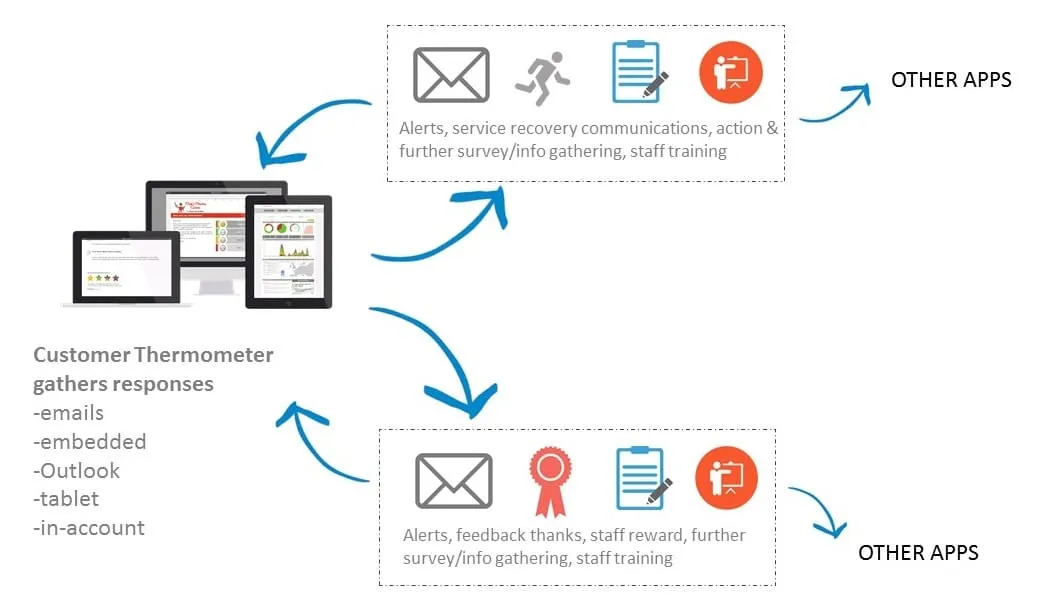
What’s possible?
Honestly, pretty much anything – you’re limited by your imagination.
Harness Customer Thermometer’s high response rate to get that initial feedback and conversation starter and then use the response to continue the discussion, ask more or trigger internal workflows to ensure the loop is closed.
There are two services you can connect with us to enable this to happen: IFTTT.com and Zapier.com. We’ll take a quick look at each one in turn. You can also watch the video below to see more detail and to be inspired.
IFTTT.com
 If this, then that is a free service which allows users to perform an action, based on an incoming trigger. For example, you could automatically add a ‘liked’ Tweet to an Evernote notebook or post an Instragram-ed photo to your Facebook account.
When applied to Customer Thermometer’s email alerts, you can set the service up to do something, whenever a specific email alert is received.
It is incredibly simple to use and is something you could have up and running in minutes.
To give you some food for thought:
- Tweet your audience when a Gold star is received
- Send a notification to a mobile device for all Green lights. A constant reminder of the work needed to move customers to a Gold star.
- Receive a phone call when a Red light is received
- Turn the Nest office thermostat up a degree when a Red light is received
- Flash the lights when a Gold star is received
Zapier.com
 Zapier is a much more sophisticated version of IFTTT.com. It is a paid service, beyond 100 Zaps (transactions) per month.
It might take you a couple of hours to understand it and its potential, however it’s time well invested.
The key to success is understanding how to “parse” the alert emails sent from Customer Thermometer. Parsing is where software scans preformatted emails and assigns variables to what it has scanned. These variables can then sent to other applications. We will publish more on this in due course.
Once you’ve sent your CT email alerts into Zapier’s parser, then the world is your oyster. Some examples of what’s possible are below:
- Add responses to a shared Google Sheet – for all to see and add actions against
- Add red and yellow responses to a to do list, like Remember the Milk
- Send an automated response to customers who’ve hit a red light explaining a colleague will be in touch within 24 hours
- Thank a Gold star response with an automated response and a discount voucher
- Create a Zendesk ticket, Salesforce or Desk case from a Red light click
- Send a follow up CT Email Thermometer to a Gold star respondent
- Send a 5 question survey to an unhappy customer
- View your latest headline figures via your mobile device, using Numerous
You can see this all in more detail below. In the meantime, watch out for more detailed demos.